Personal Access Tokens (PATs)
Personal Access Tokens (PATs) allow external applications and scripts to access the APIs of the Cloudogu EcoSystem. A PAT is associated with a user account and can be restricted to selected Dogus.
A PAT is a secret credential and must be treated like a password. Store the token securely and do not share it with other people.
Prerequisites
You must be logged in to the Cloudogu EcoSystem to manage PATs. You can only view, create, and delete your own access tokens.
Viewing and managing PATs
- Open User Management from the Warp menu.
- Go to the Security section.
- Your existing PATs are listed under My tokens.
The overview shows each token's display name, status, creation date, and expiry date. Active and expired tokens are marked accordingly. You can sort the list using the column headings.
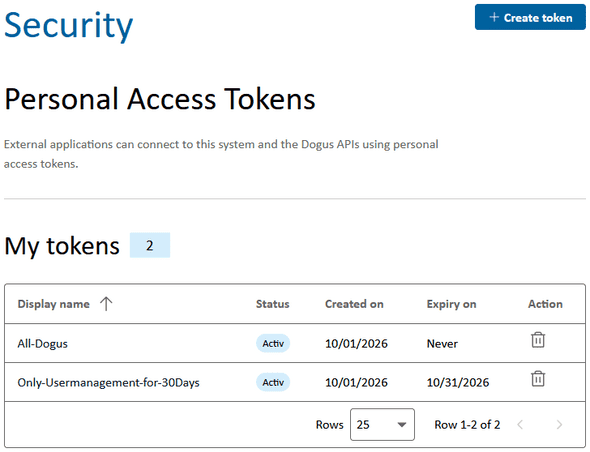
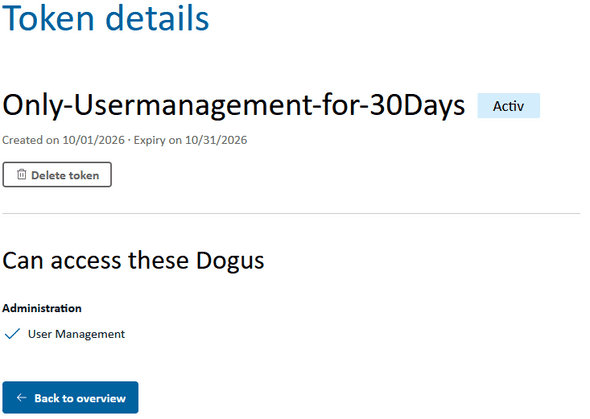
Click a token's display name to view its details and the Dogus it can access. The actual token value cannot be displayed again after creation.
Creating a PAT
- Open the PAT overview in the Security section.
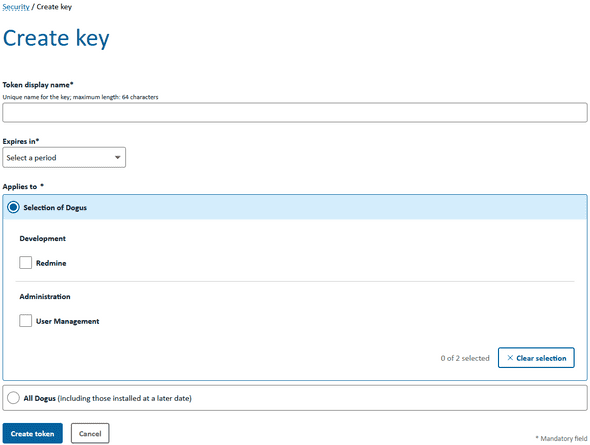
- Click Create token.
- Enter a unique Token display name. The name must not exceed 64 characters and must not contain whitespace or invisible special characters.
- Select a validity period under Expires in. The available options are 7, 30, 60, or 90 days, and Never.
-
Define the scope under Applies to:
- With Selection of Dogus, the PAT is valid only for the selected Dogus.
- With All Dogus, it is also valid for Dogus installed at a later date.
- Click Create token.
For security reasons, select only the Dogus the application actually needs and prefer a limited validity period.
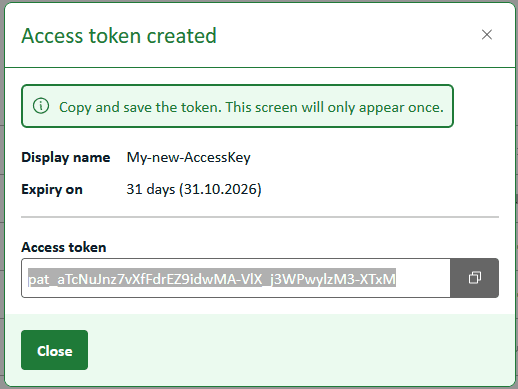
After creation, a dialog displays the new access token. Copy the complete token and store it in a secure location, such as a secret store or password manager.
Important: The token is displayed only once. If it is lost, the PAT must be deleted and a new one created.
Using a PAT
A PAT is used for API requests via HTTP Basic Authentication:
- Username: Your username in the Cloudogu EcoSystem
- Password: The PAT displayed during creation
The following example calls the User Management account API:
curl --user '<username>:<pat>' \
  'https://<ces-host>/usermgt/api/account'
Avoid embedding the PAT directly in scripts or storing it in plain text in configuration files. Use environment variables or your application's secret management instead. With curl, for example, you can enter the PAT interactively:
curl --user '<username>' \
  'https://<ces-host>/usermgt/api/account'
Access works only for Dogus included in the PAT's scope during creation. A PAT inherits the permissions of its associated user account; it does not grant additional permissions.
Deleting a PAT
Delete a PAT when it is no longer needed, has expired, or may have been exposed.
You can delete a PAT in two ways:
- Click the trash icon in the corresponding row of the PAT overview.
- Open the detail view and click Delete token.
Then confirm the deletion in the dialog.
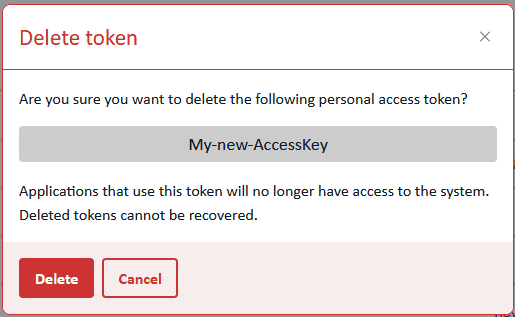
Once deleted, the PAT becomes invalid immediately. Applications using this token can no longer use it to access the system. A deleted PAT cannot be recovered.
Security recommendations
- Use a separate PAT with a descriptive display name for each application.
- Restrict the PAT to the Dogus that are actually needed.
- Choose an expiry date whenever possible.
- Transmit PATs only over encrypted HTTPS connections.
- Do not store PATs in source code, tickets, chat messages, or logs.
- Delete and replace a PAT immediately if it may have been exposed.
- Remove PATs that are no longer in use.
Troubleshooting
| Problem | Possible cause and solution |
|---|---|
The API responds with 401 Unauthorized. |
Check the username and PAT. The PAT may have expired or been deleted. |
The API responds with 403 Forbidden. |
The user account does not have the required permission, or the PAT's scope does not include the requested Dogu. |
| A Dogu cannot be selected. | Check whether the Dogu is installed and available. |
| The token value is no longer visible. | PATs are displayed in full only once. Delete the PAT and create a new one. |
| An application loses access after deletion. | This is the expected behavior. If needed, configure the application with a newly created PAT. |